Yes, though few RIA compliance platforms offer it today. RegFin connects directly to Claude and ChatGPT. Each person signs in with their RegFin account, and the assistant answers from the firm's compliance record: archived communications, the compliance calendar, alerts, reviews, policies and the audit trail. One connection brings all of it, under the permissions, approval rules and audit log your CCO already controls.
We build RegFin. The sections on example questions, permissions, the AI Activity log, consultants and setup describe RegFin specifically.
What does Claude for Financial Advisors offer for compliance?
Anthropic launched Claude for Financial Advisors on September 14, 2026. Most of it connects Claude to the systems advisors work in:
| Area | Connectors Anthropic lists |
|---|---|
| CRM | Wealthbox, Salesforce, and Redtail through Orion |
| Custodian | Charles Schwab (not yet released) |
| Portfolio and investments | Addepar, Envestnet Tamarac, SS&C Black Diamond, iCapital, BlackRock, Vanguard |
| Planning and estate | MoneyGuide (Envestnet), Wealth.com |
| Meetings | Zocks |
Three parts of it touch compliance:
- A Marketing Rule check. A compliance skill that, in Anthropic's words, "screens client-facing language against the SEC Marketing Rule to flag potential issues." It returns findings, suggested disclosures and a redraft.
- An AI-use workflow. A self-guided workflow that helps a firm document how it uses AI.
- Audit logs on Enterprise. Anthropic recommends Enterprise plans for registered investment advisers because Enterprise "includes the audit logs that support recordkeeping." On Claude Enterprise and ChatGPT Enterprise, RegFin can also archive the chats themselves.
These help an advisor. They don't run a compliance program:
- None of it reaches the compliance record. The connectors cover client, portfolio, planning and meeting data. A CCO answers an examiner from other records: archived emails and texts, personal-trading alerts, the compliance calendar, policies and past reviews.
- The Marketing Rule check sees one draft at a time. It can flag a draft that overstates performance. It can't see whether a similar claim went out by email last quarter. Its own instructions call its output "a draft review for the firm's CCO/compliance officer, not a legal determination or an approval," so the approval and the record of it still happen somewhere else.
- The audit logs record Claude, not your program. Per Anthropic's audit log article, they come only with Enterprise, cover the past 180 days and leave out the content of chats. They can't show whether the quarterly attestation is overdue or who approved last month's newsletter.
- Its safeguards are instructions. The plugin's README says its safeguards, including asking the advisor before writing anything to the CRM or another system, are "enforced by the model following them, not by the runtime."
Claude has been told to ask first, and it usually will, but an instruction is not a guarantee. Whether a change can go through without the advisor's approval depends on the system on the other end, such as the CRM, and what it checks. An AI can misread its instructions, skip a step in a long task, or be steered by wording inside an email or document it reads, so a CCO should know where approval is enforced for each connection.
RegFin fills these gaps from the compliance side. Connected to Claude or ChatGPT, it gives the assistant the archive, alerts, compliance calendar, policies and reviews. On Claude Enterprise and ChatGPT Enterprise, it also archives the chats themselves for six years, next to your email and texts. A marketing piece the assistant drafts can go straight into RegFin's marketing review, where the CCO approves or rejects it and the decision is kept. RegFin records every action an assistant takes in RegFin, whichever Claude or ChatGPT plan the person connects from. RegFin also does the approval check itself: it shows the person each change first and makes it only after they approve, so the assistant can't skip the step. For forms and marketing submissions, the person confirms in a RegFin panel inside the chat, and a firm can require every approval to come from a prompt in the assistant app that only a person can answer. How permissions and approvals work covers the detail.
If your firm is still deciding whether to roll out Claude for Financial Advisors, our Claude for Financial Advisors AI checklist for CCOs walks through that decision.
Why connect the compliance platform instead of each tool?
Compliance questions cross systems, and the compliance platform is where they already meet.
Consider a question a CCO might have: "Before the personal trade that set off this front-running alert, did the advisor email or text anyone about that stock?" Answering it means reading the alert, the advisor's archived messages and the client accounts involved, together. A connector to the CRM sees client notes. A connector to the custodian sees client positions. Neither holds the personal-trading alert or the archived texts. A compliance platform already holds them side by side, because it archives communications, monitors employee trading and pulls in client data synced from the CRM.
One connection also means one set of controls:
- Permissions you already manage. The assistant works under the role each person already has in the compliance platform. If an advisor can't open a trade alert in RegFin, the advisor's assistant can't either.
- Approvals set once. Your CCO decides once whether changes need a person's sign-off, and it applies to every assistant at the firm.
- A single audit log. Every action an assistant takes lands in the same oversight view as the rest of the program, where the CCO can also see and disconnect every assistant connected at the firm.
The connection also keeps the assistant separate from the compliance system. A firm can use Claude, ChatGPT or another supported assistant without moving its compliance records or rebuilding its controls, and RegFin applies the same permissions, approvals and audit log whichever one a person uses. When assistants improve, the firm gets the benefit without waiting on its compliance vendor.
What can a CCO ask Claude or ChatGPT once RegFin is connected?
Ask in plain English, inside the assistant. These are examples of what RegFin can answer today:
| You ask | What comes back |
|---|---|
| "Search our archived emails, texts and social posts for anything promising guaranteed returns." | Matching messages from the firm's communications archive, found by meaning as well as exact words |
| "Is every archive channel capturing?" | The archive's health for each channel, such as website, social, email and text messages |
| "Which personal-trading alerts are still open, and who has them?" | Open trade-rule and front-running alerts from employee trade monitoring, with severity, status and assignee |
| "Who hasn't finished the quarterly attestation, and how overdue are they?" | Completion by person from the compliance calendar, with overdue counts and how long the oldest has waited |
| "Which client annual reviews are overdue?" | The review pipeline, filtered to what's late |
| "What meetings and notes do we have on the Henderson household this year?" | Logged client meetings and notes, limited to clients the person can see |
| "Check this LinkedIn post against the Marketing Rule, then send it to review." | RegFin runs the post through the same check its marketing review uses and returns the flagged passages, the rule behind each and suggested rewrites in the chat. After you approve the filing, the post lands in your review queue for the CCO's decision |
| "Has anything changed that might require a Form ADV amendment?" | Change signals and amendment assessments, with filing status |
| "Show our high-risk vendors and where each due-diligence review stands." | Vendors by risk tier, with assessments and questionnaire progress |
| "Who changed this client's record last week, and what changed?" | The audit history: who, what and when |
| "What does Rule 204-2 require us to keep, and what does our policy say?" | The regulation text with its citation, plus the matching section of your policies |
| "Create a task for advisors to complete the Code of Ethics attestation by Friday." | A preview of the task, created only after approval |
| "Go through our compliance forms folder in Google Drive and recreate each one in RegFin." | With Google Drive also connected to the assistant, a draft RegFin form for each document, with its sections, questions and answer types, each created after approval. Nothing goes out to staff until you review and publish it |
A firm with its compliance forms in Google Docs can move them into RegFin this way without anyone retyping a question.
Answers are derived from your compliance records, limited to what the person can open in RegFin, and regulatory citations come from RegFin's curated regulatory corpus. An assistant can still misread a record or a rule, so check the source before you rely on an answer in a filing or a decision.
Exam preparation works the same way. Ask the assistant to run a mock exam or an exam-readiness analysis, and RegFin saves the results, findings and remediation tasks in the platform, after approval.
Many connectors only let an assistant look things up. RegFin's connector gives Claude or ChatGPT more than 70 actions across nearly every part of RegFin, so the assistant can do the work as well as answer questions: create and update tasks, log client notes and meetings, record gifts and outside business activities, submit a preclearance request, add a trade rule, and draft and save policies, each through the approval step below. Our goal is for a firm to be able to run its entire compliance program from its assistant if it chooses, without opening the RegFin web app at all.
How do permissions and approvals work?
RegFin controls a connected assistant in four layers: who is signing in, which areas the assistant can reach, whether its changes need approval, and who can disconnect it.
1. Each person signs in with their RegFin login
There is no shared key and no separate account for the assistant. The assistant can see and do only what that person can in RegFin, so an advisor's assistant gets an advisor's view.
2. The person chooses which areas the assistant can reach
When the assistant connects, RegFin's sign-in page lists each area it is asking for, such as Client records, Personal trading and code of ethics, Forms and tasks, Firm governance, Audit trail, or Communications and advertising, and whether it wants to read only or also make changes. The assistant sees only the areas the person approves. If it needs another area later, it asks.
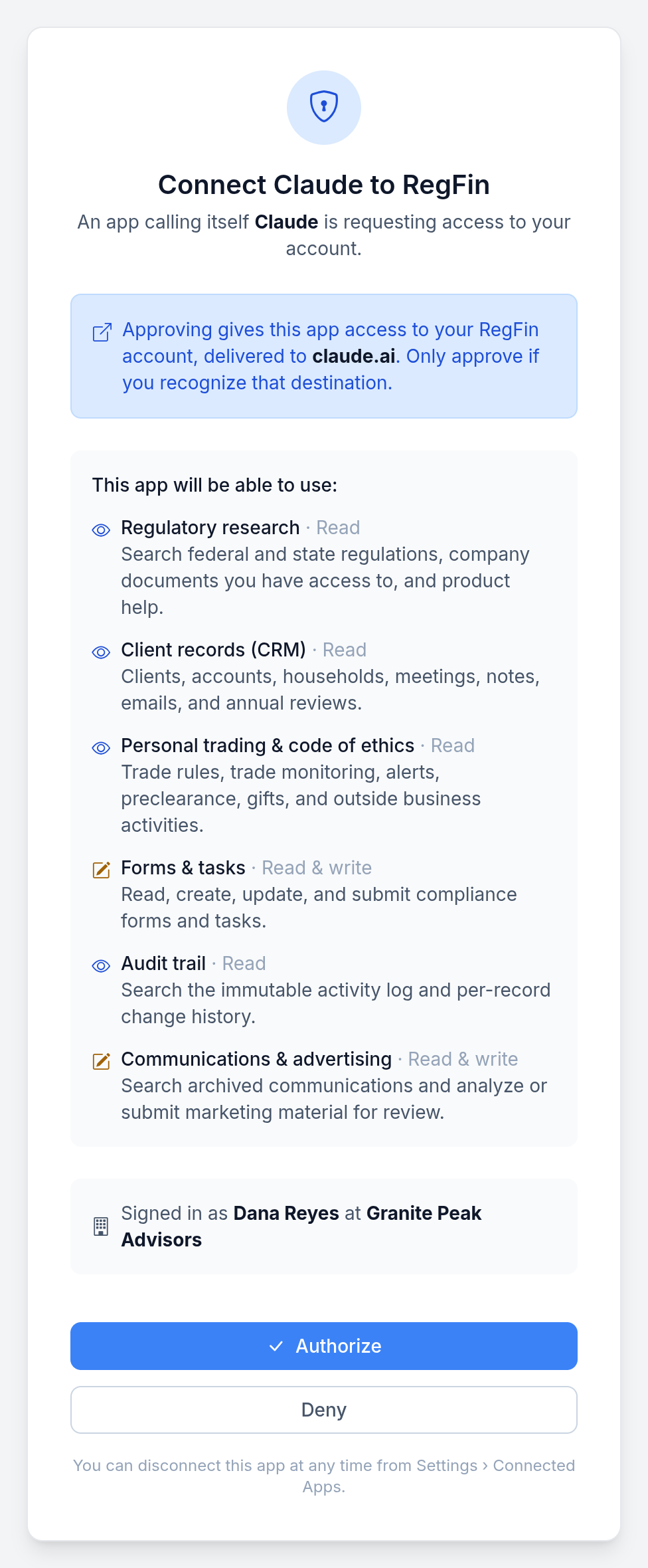
Before anything is shared, the person signing in sees each area the assistant asks for and whether it can only read or also make changes.
3. Changes wait for approval
Before the assistant creates a task, logs a client note or submits a marketing piece, RegFin shows you the change and waits for your OK. Nothing is saved until you give it. By default, the assistant shows you the preview and passes your yes back to RegFin. The panels and the strictest setting below take the assistant out of that step. Each OK covers one change, once, and expires after 10 minutes. If the assistant alters any detail, RegFin asks again.
An assistant can be told to ask before it acts, but it is still the assistant deciding whether to ask. For work that needs a person, such as filling out a compliance form or sending a marketing piece to the CCO for review, RegFin opens its own panel inside the chat in assistants that support one. The user sees exactly what will be saved and confirms it there, and RegFin saves nothing until that confirmation arrives. RegFin enforces the confirmation itself. It is not an instruction you hope the assistant follows because you told it to.
Your CCO or compliance team chooses how strict approval is:
| Setting | What happens |
|---|---|
| Approve each change (recommended, the default) | Changes wait for approval as described above |
| Approve in the app's own prompt only (strictest) | The approval must come from a prompt in the assistant app that only a person can answer, separate from RegFin's panels. Assistants that can't show that prompt can look things up but cannot make changes |
| No approval step | Changes happen as soon as they are asked for |
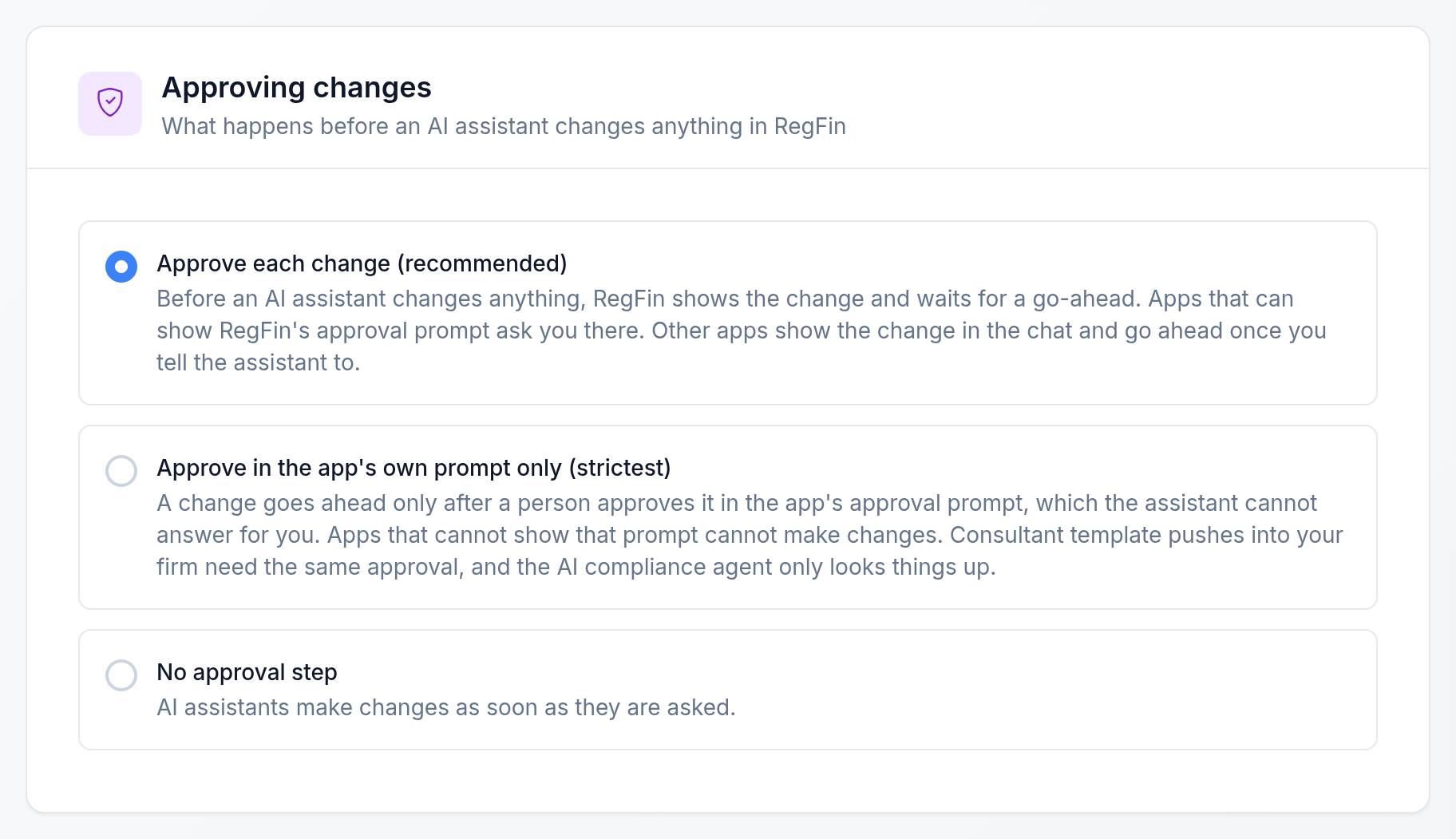
The CCO or compliance team picks one approval setting for the whole firm.
4. The CCO can see and disconnect every assistant
Each person sees their connected assistants in RegFin and can disconnect one at once. The CCO and compliance team see every assistant connected at the firm and can disconnect any of them.
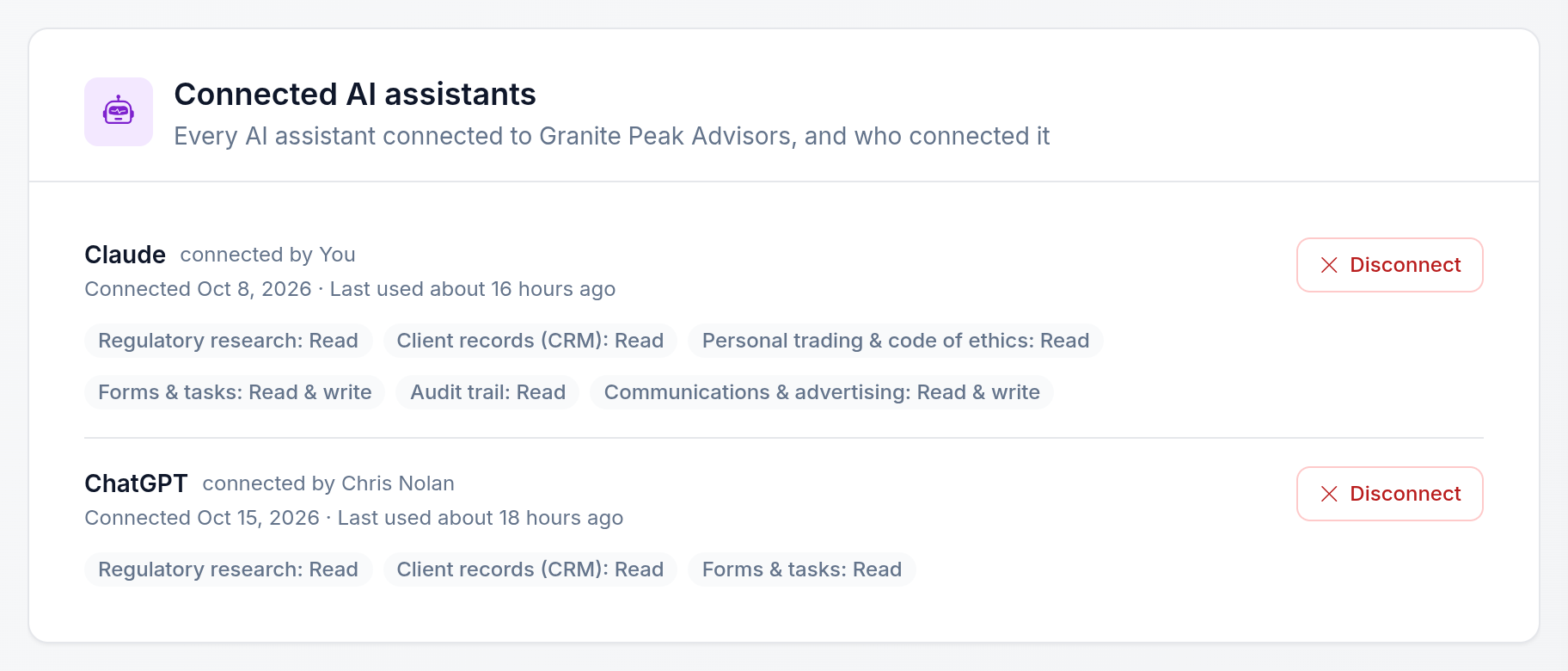
The CCO sees each assistant connected at the firm, who connected it and what it can reach.
What does the AI Activity log record?
Every action an assistant takes in RegFin goes into the firm's AI Activity log, which CCOs and the compliance team review under Oversight. Each row shows when it happened, whose sign-in was used, what the assistant did, which area it touched, whether it read or changed something, and the result: completed, shown for approval, approved in the chat, approved in the app's prompt, declined, blocked by the strictest setting, or failed. A change shown for approval that was never approved is one the assistant proposed that never happened.
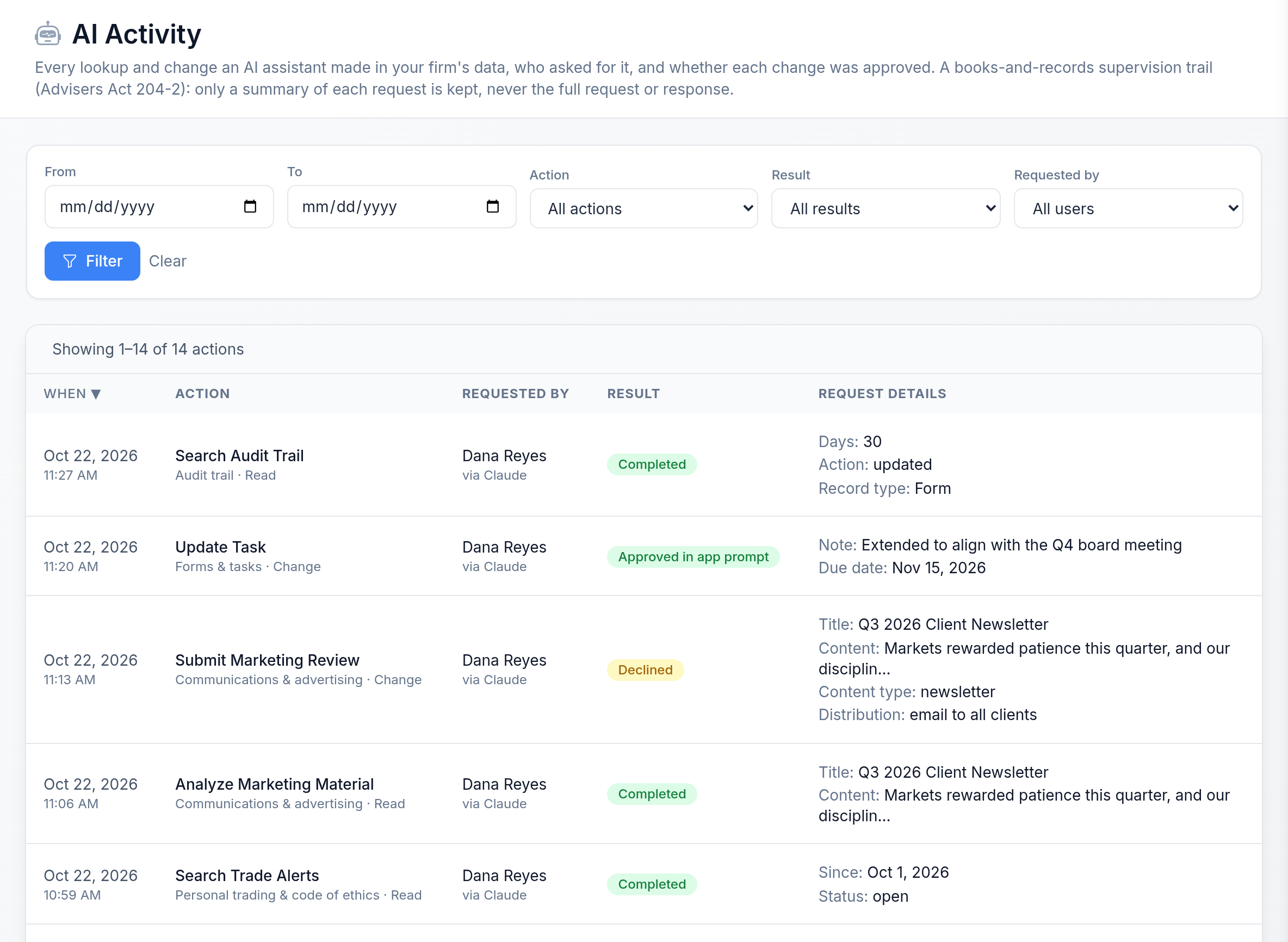
AI Activity lists each lookup and change, whose sign-in it used, and whether a change was approved or declined.
The log is a supervision record. It keeps a short, redacted summary of each request and hides sensitive values such as account numbers and tax IDs. RegFin keeps it for six years, a year beyond the five-year retention period in Rule 204-2, the SEC's books and records rule.
Two limits affect your AI policy:
- The chat itself is a separate record. AI Activity shows what the assistant did inside RegFin. The conversation, including the prompts and the assistant's replies, is held by Anthropic or OpenAI. Only enterprise plans make it available for archiving: Anthropic's Compliance API on Claude Enterprise, and OpenAI's Compliance Platform on ChatGPT Enterprise and Edu, which holds conversations for only 30 days. On those plans, RegFin can archive the chats themselves for six years, check them with the same keyword list and policies as your email and texts, and keep an archived chat even after a user deletes it. Archiving can't reach far back, so connect it before the rollout. On other plans there is no supported way to archive the chat, so if your policy treats AI chats as records, keep record-creating work off them.
- Refused requests are not listed. A request RegFin turns away before anything runs, for example because the person hasn't accepted updated terms, does not appear in the log.
Rule 204-2 sets the books and records an adviser must keep, and AI use is on the SEC's exam priorities. A log of what each assistant did inside your compliance records, and who approved each change, is evidence you can show that your AI policy is being followed.
Is it safe to put client data into Claude or ChatGPT?
Treat the AI provider as a service provider under Regulation S-P. The rule defines a service provider as any person or entity that "receives, maintains, processes, or otherwise is permitted access to customer information through its provision of services directly to" the firm (17 CFR 248.30(d)(10)). Customer information is any record containing nonpublic personal information about a client. When an advisor pastes a client's account details into Claude, or the assistant reads a client record through a connector, Anthropic or OpenAI receives and processes that information while providing a service to the firm under the firm's plan.
That brings in the 2024 Reg S-P amendments, which require covered institutions, including registered investment advisers, to keep a written incident response program, oversee service providers that handle customer information through due diligence and monitoring (17 CFR 248.30), and notify affected individuals as soon as practicable, and no later than 30 days after becoming aware, when their sensitive customer information was, or is reasonably likely to have been, accessed or used without authorization. Notice is not required if a reasonable investigation finds the information has not been, and is not reasonably likely to be, used in a way that would cause substantial harm or inconvenience. Larger SEC-registered advisers had to comply by December 3, 2025, and smaller SEC-registered advisers by June 3, 2026, so the oversight duty already covers any AI provider that handles your customer information. State-registered advisers fall under the FTC's Safeguards Rule and state law instead. The full requirements are in our Regulation S-P guide.
In practice:
- Keep client information out of personal or consumer AI accounts.
- Use a business or enterprise plan whose terms limit how prompts and data are used, retained and trained on, and diligence the provider like any other vendor.
- In RegFin, the AI provider goes in the same vendor register as your custodian and CRM. Mark its product as handling client information, and RegFin shows whether the contract terms and a safeguards review from the past year back that up. If the provider reports a breach involving client data, RegFin tracks the 30-day client-notice deadline and raises alerts as it gets closer.
- Remember that whatever the assistant reads, including answers from a connected compliance platform, becomes part of the conversation. A connected platform narrows what the assistant reads to what a question needs and what the person may see. The provider's data terms still apply to the chat.
What does the SEC expect when advisers use AI?
The SEC allows it and is watching it. The Division of Examinations listed firms' use of artificial intelligence and automated tools among its fiscal 2026 examination priorities, and its fiscal 2027 priorities, released October 23, 2026, say it is intensifying its review of how these tools influence outcomes. In March 2024 the SEC charged Delphia and Global Predictions with false and misleading statements about their use of AI, with civil penalties of $225,000 and $175,000.
Three things follow for a CCO:
- Describe AI accurately. Whatever your Form ADV, marketing or client conversations say about AI has to match what the tools do. Marketing claims also fall under the Marketing Rule, Rule 206(4)-1.
- Supervise it inside the program. Rule 206(4)-7 requires written policies and procedures reasonably designed to prevent violations, an annual review of them, and a designated chief compliance officer to administer them. AI use belongs in those policies, and responsibility stays with the firm.
- Keep records. Know what the assistant did, who approved it and where the records are, before an examiner asks.
Can compliance consultants use it across their client firms?
Yes. A consultant can work across every active firm the consultancy manages from the same assistant. Ask the assistant to list your firms, then name the firm in each request: "In Acme Advisory, which annual review items are still open?" You can move from firm to firm in one conversation, and each request to RegFin is limited to the firm you name and that firm's access rules.
- See what is waiting across the book. Ask for your escalation queue and get every open escalation across your firms, so you know where to start.
- Build once, push to many firms. Create a policy, form, task or trade-rule template and push it to the firms that need it, after a preview shows exactly which firms it reaches. The strictest approval setting among those firms applies to the push.
- The firm still sees your work. Everything a consultant does inside a firm follows that firm's approval rules and lands in its AI Activity under the consultant's name and consultancy.
See how consultants run client programs on RegFin for compliance consultants.
How do you connect RegFin to Claude or ChatGPT?
There is nothing to install and no key to copy.
- Add RegFin to the assistant. In Claude, add RegFin as a custom connector. On a Claude Team or Enterprise plan, an organization owner adds it first, then each person connects. In ChatGPT, add RegFin as a custom plugin; your ChatGPT plan must allow custom plugins.
- Sign in with your RegFin account. RegFin opens its own sign-in page. Review the areas the assistant is asking for and authorize. If your firm requires two-factor authentication, set it up in RegFin first.
- Turn on the RegFin tools in a chat and ask. Start with a look-up, such as your open alerts, before trying a change.
The connection address, other supported assistants and the technical detail are on our page about connecting Claude, ChatGPT and other AI assistants to RegFin. For what RegFin's own AI does inside the platform, see AI compliance tools for RIAs, and for how to judge any AI compliance vendor, our six tests for evaluating AI compliance software. The program all of this supports is covered in the RIA compliance guide.
The bottom line
You can connect compliance software to Claude or ChatGPT today, and the compliance platform is the connection to make. It is where your firm's compliance data lives: archived communications, alerts, the compliance calendar, reviews, policies, vendor files and client records. It is also where the audit log comes from. Every action the assistant takes in RegFin lands in a six-year record you can show an examiner: what it did, whose sign-in it used and how each approval turned out. On Claude Enterprise and ChatGPT Enterprise, the chats themselves can go into the same archive as your email and texts. One connection gives you one set of permissions, one approval rule and one audit log for the CCO to manage, instead of a separate set for every tool.
Few RIA compliance platforms connect to Claude or ChatGPT at all. RegFin's connector reaches nearly the entire platform, with more than 70 actions, approvals that RegFin enforces, and a consultant view across every client firm. That breadth is what lets a firm run its compliance program from the assistant itself.
Curious what your own compliance questions look like when Claude can answer them from your firm's records? Book a demo → and bring the questions you'd ask first.
Frequently asked questions
Can I connect my compliance software to Claude or ChatGPT?
Why connect the compliance platform instead of each separate tool?
Does Claude for Financial Advisors include my compliance records?
Can RegFin archive Claude and ChatGPT chats?
Can ChatGPT connect to RegFin?
Can the assistant change compliance records without approval?
Does RegFin archive my Claude or ChatGPT conversations?
Sources
- Introducing Claude for Financial Advisors (September 14, 2026) — Anthropic
- Compliance API FAQ — Anthropic
- OpenAI Compliance Platform for Enterprise and Edu customers — OpenAI
- 17 CFR Part 248, Regulation S-P — eCFR
- Get started with custom connectors — Anthropic
- 17 CFR 275.206(4)-7, Compliance procedures and practices — eCFR
- 17 CFR 275.204-2, Books and records to be maintained by investment advisers — eCFR
- 17 CFR 275.206(4)-1, Investment adviser marketing — eCFR
- SEC Charges Two Investment Advisers with Making False and Misleading Statements About Their Use of Artificial Intelligence (Press Release 2024-36) — U.S. SEC
- SEC Adopts Rule Amendments to Regulation S-P to Enhance Protection of Customer Information (Press Release 2024-58) — U.S. SEC
- Division of Examinations, Fiscal Year 2026 Examination Priorities — U.S. SEC
- Division of Examinations, Fiscal Year 2027 Examination Priorities — U.S. SEC